Selling Print-on-Demand Postcards on Shopify: From First Store to Growing Catalog
Postcards are one of the easiest personalized products to put in front of a Shopify audience: low price, fast decision, and a reason to buy for every trip, wedding, birthday, and holiday season. The catch is that Shopify sells the card but cannot make it. There is no built-in postcard editor and no production layer, so print on demand postcards Shopify stores sell always run through an integration. This guide covers how to sell postcards on Shopify in three stages: connecting a design and production layer, choosing the right app, and growing the store once orders come in. For the full category overview, start with our complete guide to selling print-on-demand postcards.
Does Shopify Have Built-in Postcard Printing?
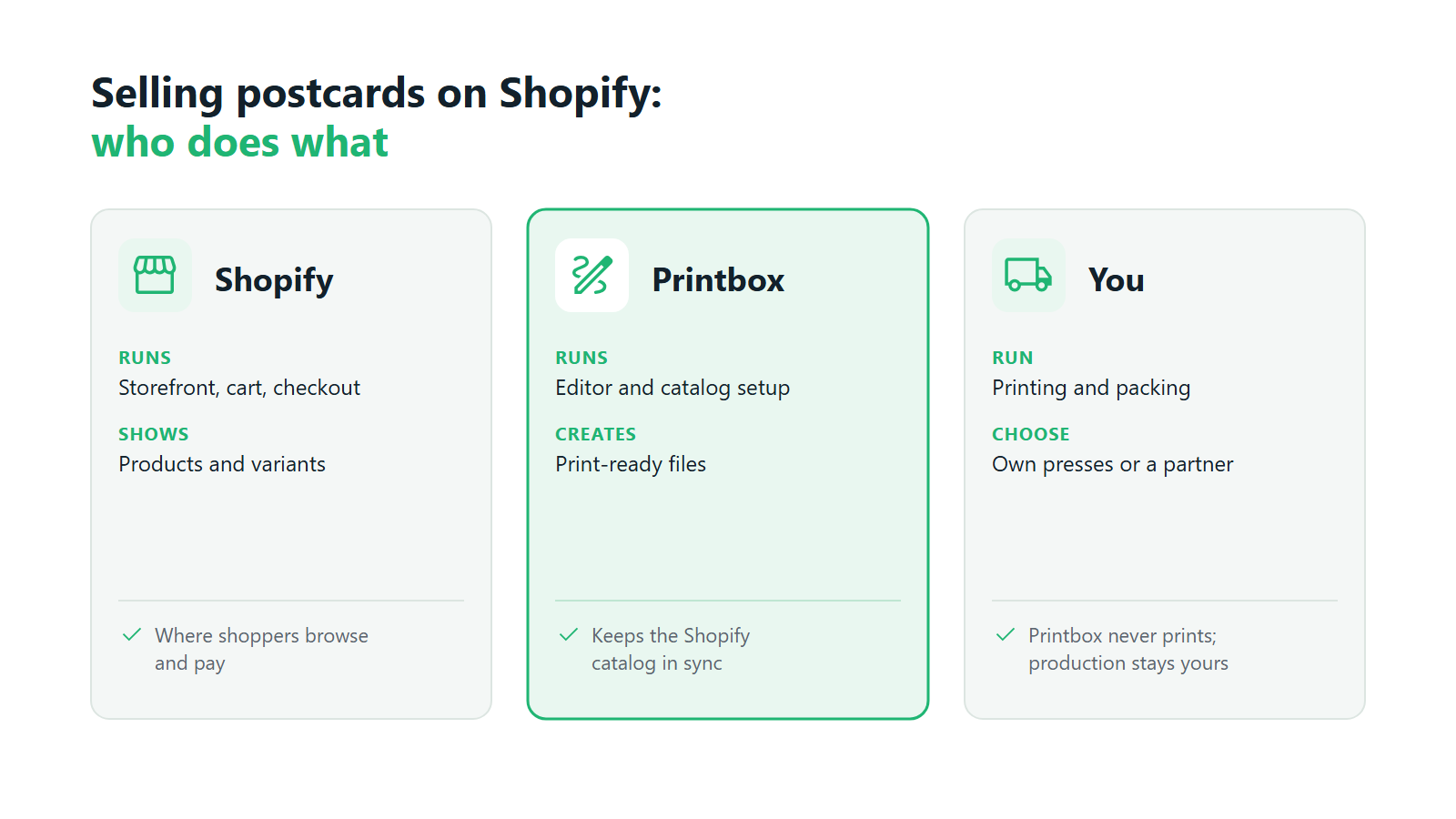
No. Shopify handles the storefront, product pages, checkout, and payments. It does not give your customers a way to place their own photo on a card, write a message, choose a paper, and see the result before paying. It also does not turn a paid order into a file a printer can use.
Both gaps get filled the same way across the platform: either with an app from the Shopify App Store or with an external platform connected through its API. Both are standard practice on Shopify, and the integration you pick shapes the quality of your postcard business more than any theme choice. If you want the broader background first, our explainer on whether Shopify has print-on-demand walks through the general model.
How to Add Postcard Design & Print-on-Demand to Your Shopify Store
There are two realistic routes, and they suit different stages of a business.
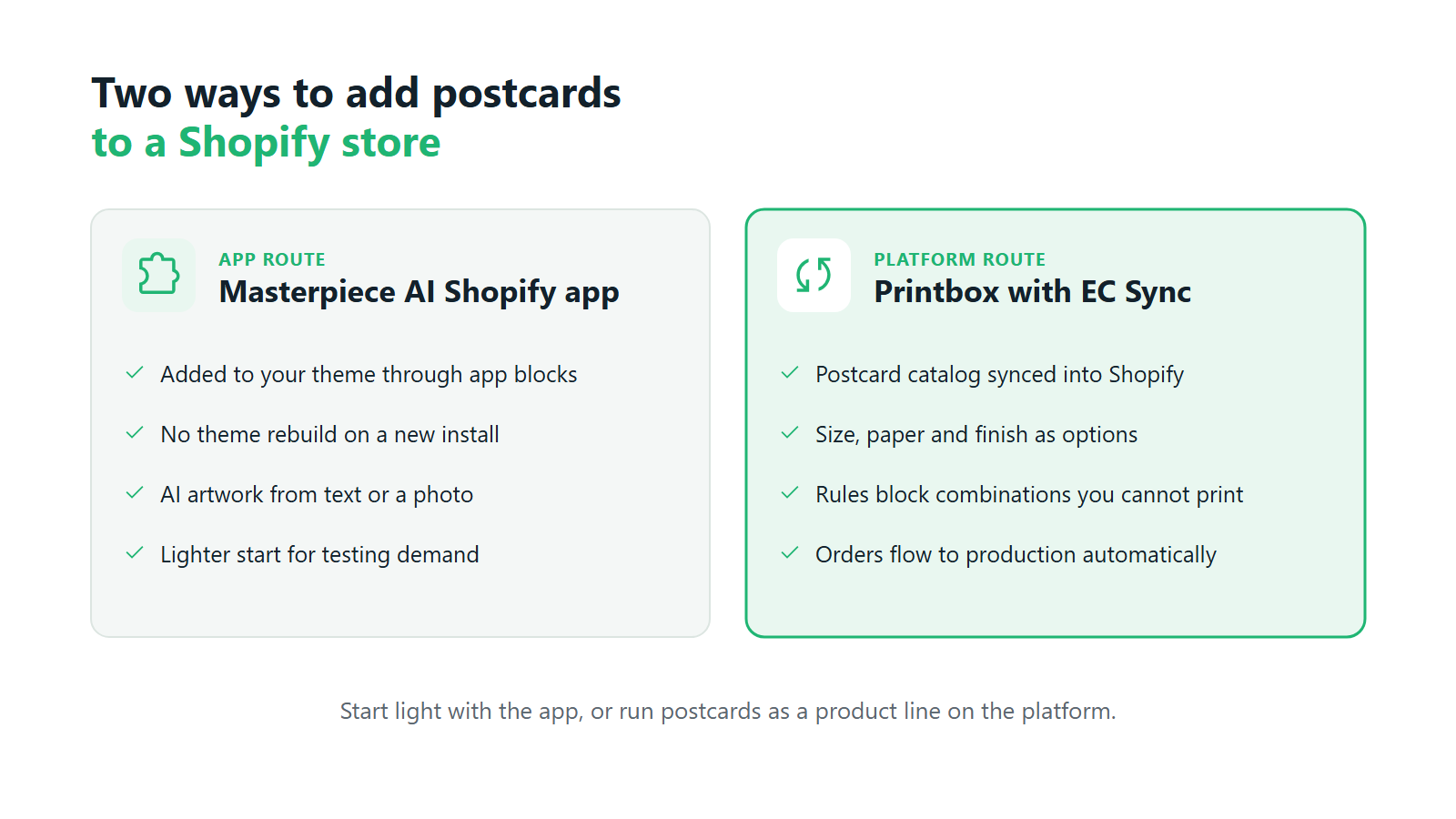
A full platform connected to your store. The platform holds the product catalog, the customer-facing editor, and the production logic, while Shopify stays the place where people browse and pay. This route fits sellers who treat postcards as a product line: several sizes, a few paper stocks and finishes, occasion collections, and a steady flow of orders that needs to reach production without manual handling.
An app added to your existing theme. This route adds one specific capability to the store you already run. For postcards, the most useful example is AI-generated artwork: a shopper who arrives without a good photo can still leave with a card that looks like nobody else’s. Setup is lighter and the rest of the store stays as it is.
The decision usually comes down to how much of your revenue you expect postcards to carry. A store testing whether its audience buys personalized cards at all can start with an app. A print business or photo-products brand planning a real catalog gets more from the platform route. The hard part of a postcard business sits behind the storefront: keeping product options consistent and getting every order into production as a clean file. Whichever you choose, a working postcard print on demand Shopify setup gives the customer a design step they can finish alone and gives your printer a file that needs no rework. The mechanics behind both routes are covered in our technical guide to how print-on-demand integration works on Shopify.
How Printbox connects postcard print-on-demand to Shopify. Printbox covers the platform route through EC Sync, which keeps your Shopify catalog in sync with Printbox automatically. You manage postcard products and their options in Printbox, including size, paper, and finish as configurable attributes, and EC Sync pushes them to the store with no custom sync code to write. Attribute mapping and rules for valid combinations mean a shopper cannot buy a configuration your production line cannot make, such as a finish that a given paper cannot take. Orders then travel to production automatically along their own path.
On the storefront, customers design postcards in the Simple Editor, which lists postcards and invitations among its products, or in the mobile-first Flex Editor, built for personalized cards and gifts. They add their own photos and text, and for batches of individually named cards, the editor supports variable data printing. Every order generates a print-ready production file automatically. Printbox is white-label software and never prints anything itself, so production runs on your own presses or with a fulfillment partner you choose. That is the whole Shopify postcard print on demand integration in one sentence: the catalog lives in Printbox, the shopping happens in Shopify, and the file goes to your printer. Our Shopify print-on-demand integration page shows the connection in more detail.
What to Look for in a Shopify Postcard App
Most print on demand postcards Shopify apps look alike on a demo page. The differences surface after a few hundred orders, so test every candidate against the same list.
- Formats and paper. Check which postcard sizes the app supports, whether you can add your own, and how paper stock and finish are set up. They should be customer-facing options with their own pricing, configured once in the catalog and shown consistently on every product page.
- Personalization of text and photos. The editor is where the sale happens. Shoppers should be able to place a photo, crop it, add a message in a readable font, and see a realistic preview on a phone as easily as on a laptop. Ask whether the app warns customers about low-resolution photos before they order.
- Single orders and batches. Most postcard orders are a single card or a small set. Some are a run of fifty save-the-dates with a different name on each. Your setup should handle both from the same product, without a separate workflow for the larger order.
- Catalog sync and order flow. Find out which system owns your product data and how a paid order reaches production. If you update sizes or prices in two places, mismatches follow as the catalog grows, and a shopper eventually orders something you cannot print.
- AI as an option. A Shopify postcard design app with AI generation gives a design path to shoppers who arrive without a photo. Treat it as an extra entry point next to the regular editor, since most postcard buyers still want their own pictures on the card.
There is no single best app for every store. Our guide to choosing print-on-demand postcard software goes deeper on the comparison, including what to ask vendors before you commit.
How to install AI postcard generation on Shopify with Printbox. The Masterpiece AI Shopify app is available in the Shopify App Store and adds AI artwork to the store you already have. It installs through app blocks, so a new install needs no theme rebuild. Shoppers create a unique postcard design from a text prompt (text-to-image) or restyle an uploaded photo (image-to-image), which turns an ordinary holiday snapshot into an illustration-style card worth sending. Output is upscaled automatically to print resolution and goes through Printbox’s standard print engine, so AI designs reach production the same way as any other order. Every prompt is moderated automatically, blocking inappropriate content and prompts that reference copyrighted characters, styles, or public figures. AI stays an optional path, and customers who prefer to design by hand keep the manual editor. As a Shopify postcard design app, it gives a seller with no design team a product that changes with every customer.
Brands are already moving this way: Adobe data shows 25% of brands using generative AI to personalize images, infographics, or video.1 The wider Masterpiece AI suite covers the same capabilities beyond Shopify.
Growing and Scaling Your Postcard Store on Shopify
Getting live was about the editor and the integration. Growth is about range, order size, and how much manual work each new order creates. Once your print on demand postcards Shopify catalog has regular buyers, growth usually comes in three moves.
Widen the catalog. Postcards rarely stay alone. The same customer who designs a travel card is a likely buyer for a greeting card, an invitation, a calendar, or a poster from the same photos. Every added category raises the value of the traffic you already pay for. Add categories that share a design habit with postcards, so the customer can reuse what they uploaded. Our guide to selling custom photo and travel postcards shows where those adjacent products come from.
Move from single cards to batches. Wedding stationery, event invitations, and business mailings arrive as orders of dozens or hundreds of cards, often with a different name on each one. These orders carry more revenue per customer, and they are also where manual handling breaks first. If your team has to build each personalized card by hand, the bigger order becomes the less profitable one.
Match the integration to the stage. A store that started with a lightweight AI app can move to the full platform once postcards carry real volume. If you run more than one store, for example separate shops for different countries or brands, Printbox supports several stores under one account, depending on your plan, with each store connected separately.
Questions about whether the model holds up at higher volume, and how to open new channels and markets, have their own guides: is print-on-demand scalable, selling personalized products across multiple channels, and expanding personalized products into international markets. For a postcard print on demand Shopify store, growth means changing the catalog and the order mix while keeping the system.
How to grow postcard sales on Shopify with Printbox. Printbox is built so that growth does not force a platform change. A single postcard and a large order run on the same platform. The Prints Editor handles photo prints ordered in volume, and quantity-based price tiers are configurable. Variable data printing turns an uploaded CSV file into a batch of individually personalized cards, each rendered as its own print file. A print-ready production file is generated automatically for every order, so rising order counts do not add file preparation work for your team. New categories go into the same catalog that EC Sync keeps in sync with your Shopify store, and stores on plans with several shops connect each one separately under one account. Printing capacity stays on your side: as volume grows, you scale your own presses or your fulfillment partner, while Printbox carries the editor, the catalog, and the files.
Frequently Asked Questions
Does Shopify have a built-in postcard maker?
No. Shopify has no native postcard editor and no print production. Stores add one of two things: an app from the Shopify App Store, or an external platform connected through an API. That integration gives customers a design step and gives your printer a print-ready file.
What’s the difference between EC Sync and the Masterpiece AI Shopify app?
EC Sync connects the full Printbox platform to your store and keeps your postcard catalog, with its sizes, papers, and finishes, in sync from Printbox to Shopify. Orders then flow to production automatically along a separate path. The Masterpiece AI Shopify app adds AI-generated artwork to your existing theme through app blocks. Choose EC Sync to run a full postcard catalog, and the app to add AI design with minimal setup.
Can customers add their own text and photos to a postcard in my Shopify store?
Yes. With Printbox, customers personalize postcards in the Simple Editor or Flex Editor, placing their own photos and writing their own message with a live preview. For batches with a different name on each card, variable data printing fills the cards from a CSV file. That covers most of what a custom postcards Shopify store sells, from a single holiday card to a full set of invitations.
Do I need to rebuild my Shopify theme to add postcard print-on-demand?
No. A new install of the Masterpiece AI Shopify app goes in through app blocks, so the theme stays in place. With EC Sync, products are synced into your existing store automatically, with no custom sync code. Most of how to sell postcards on Shopify comes down to the integration you choose, while the storefront itself can stay as it is.
How do I scale my Shopify postcard store as orders grow?
Widen the catalog with related products, build for batch orders such as wedding and event stationery, and keep production files automated so each new order adds no manual work. Choose an integration that handles single cards and large orders on the same platform. That way you can grow postcard sales on Shopify without switching systems as volume rises.
What are the key features of a print-on-demand postcard tool from Printbox for Shopify?
Printbox gives print on demand postcards Shopify sellers the Simple Editor and Flex Editor for postcard design, with photos, text, and configurable sizes, papers, and finishes. Variable data printing handles batches of individually personalized cards. A print-ready production file is generated automatically for every order. EC Sync keeps the catalog in sync with your store, with rules that block combinations you cannot produce, and orders flow to production automatically. Masterpiece AI adds optional text-to-image and image-to-image artwork with prompt moderation. Printbox is white-label, runs with your own presses or a fulfillment partner, and has launched stores in more than 50 countries. See the full offer on our [postcard print-on-demand software page](https://www.getprintbox.com/postcard-print-on-demand-software), which covers the whole path from a Shopify listing to the press.
Sources
- Adobe Digital Trends data, as cited in Redfox, Trends in User Journeys 2025, p. 8. ↩︎

Sylwia Kopeć
She collaborates with her team to develop and implement the company's marketing strategies. With a strong background in marketing communications, online marketing, and content marketing, she efficiently integrates these strategies into the brand. Her focus on omnichannel digital campaigns, keen analysis of client needs, and creative approach have delivered significantly enhanced Printbox's market presence.