Selling Custom Photo and Travel Postcards Online: From First Product to Growing Catalog
Custom photo postcards let a customer take a picture from their own camera roll, often from a trip, and turn it into a printed card they keep, mail, or hand to someone. For a print-on-demand seller, that makes the postcard one of the simplest ways into personalized photo products: a flat format, a low production cost, and a reason to buy that comes back with every holiday. This guide covers why the niche works, what the customer’s path from photo to order should look like, how to catch photo quality problems before production, and how to grow from a first postcard into a full catalog.
Why Photo and Travel Postcards Work as a Print-on-Demand Niche
Travel photos carry more weight than almost anything else on a phone. They mark a place, a person, and a moment the customer chose to keep. In a Crystal Ski survey, 60% of British respondents said they recreate the trips of their own childhood with their children.1 That says a lot about how long holiday memories stay with people. A printed postcard gives those memories a physical form, and that emotional value is what lets a small card sell at a healthy price.
The format helps the business side just as much. A postcard is a single flat sheet: one print, no binding, no assembly, and light enough to ship cheaply. Production cost stays low, a new design adds nothing to inventory, and custom photo postcards carry the customer’s own photo, which a stock card never can.
Postcards also fit two buying moods. Some customers order personalized travel postcards for themselves, as a keepsake from a trip or a set for a scrapbook. Others buy them as a gift or a thank-you: a card for the friend who hosted them, a set for grandparents who missed the trip. Both moods repeat. A customer who prints cards after a summer holiday has a reason to come back after the next trip, the next family event, and the next December.
If you are building a travel photo postcards business from scratch, that repeat cycle is the real asset. The first order costs you acquisition spend; every later trip is a cheaper sale to someone who already trusts your quality. For the wider picture of the category, our guide on how to sell print-on-demand postcards covers formats, pricing, and channels.
How Customers Create a Photo Postcard
The customer’s path should be short enough to finish on a phone in a few minutes. In practice it has five steps:
- Choose the format. Size, paper, and finish are picked up front, so the layout matches what will be printed.
- Upload the photo. Most travel photos live on a phone, so the upload has to work from a mobile browser without a detour through a laptop.
- Add text. A greeting, a place name, a date. Short text on a postcard does a lot of work, and customers want control over the font and placement.
- Preview. The customer checks the crop, the text, and the overall look before paying.
- Order. Quantity, delivery, payment, done.
The weak point in most stores is step two. Customers want to turn vacation photos into postcards while they are still on the trip or on the flight home, holding only a phone. If the editor is slow, cramped, or built for a desktop, those sessions end before the upload finishes. Any photo postcard maker for online store owners has to be built around the phone first and the desktop second.
How Printbox Handles Photo Postcard Creation on Mobile
Printbox gives postcard sellers two editors to build this path. The Flex Editor is mobile-first and made for personalized cards and gifts. It adapts to each product and shows the customer only the options that matter for it, so a postcard does not come with controls meant for a photo book. A realistic preview shows the finished card before checkout, which is what gives a customer the confidence to pay for something they designed on a small screen. The Simple Editor follows a “design first, configure later” flow with a real preview, and its product range covers stationery such as postcards and invitations. Each product can use the editor that suits it, so a quick photo card and a more designed greeting card can sit in the same store.
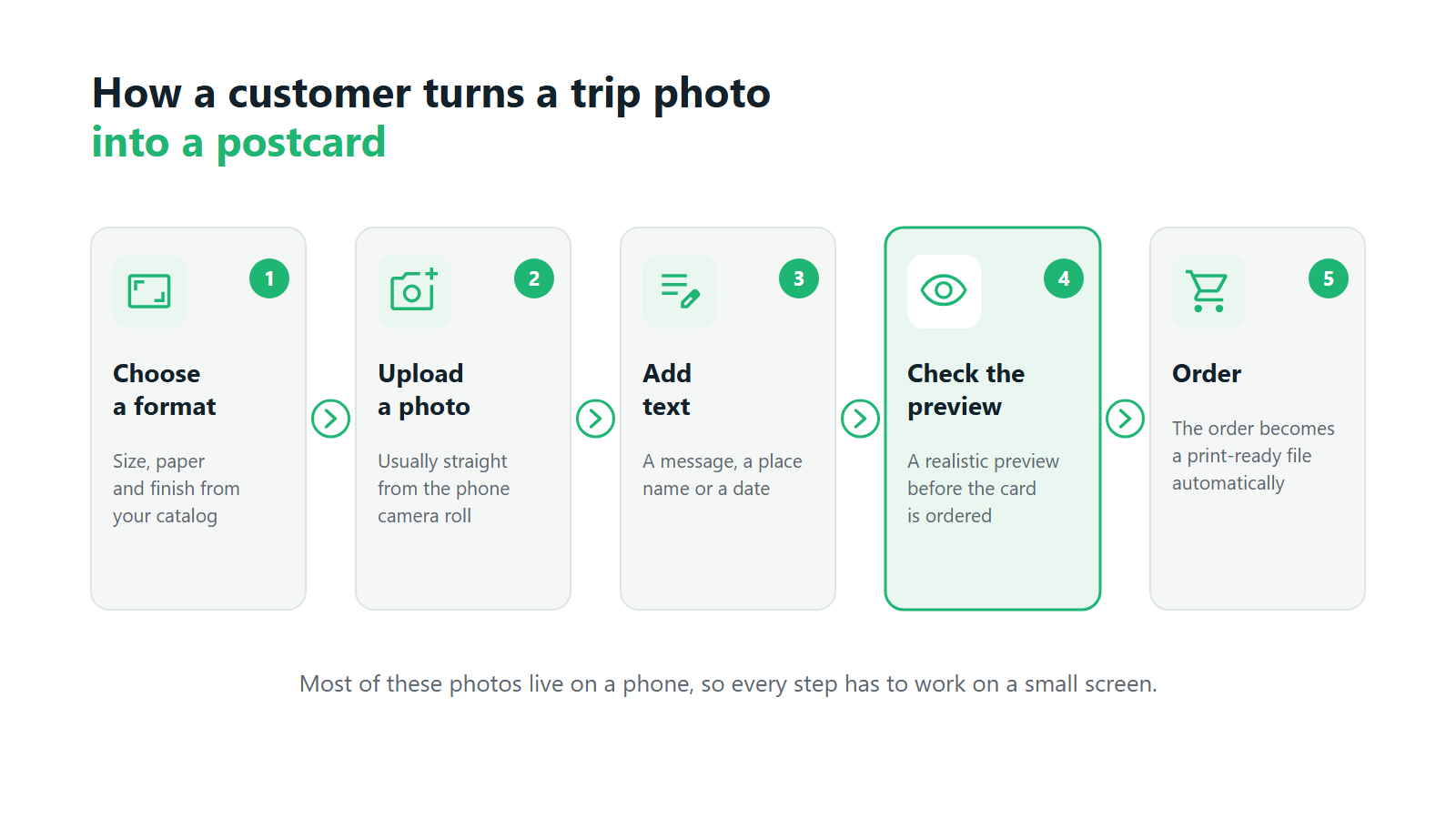
Photo Quality: Catching Problems Before Production
With any product built on customer photos, the photo itself is the main source of complaints. The editor can be flawless and the print still disappoints if the image was dark, badly white-balanced, or too small for the card.
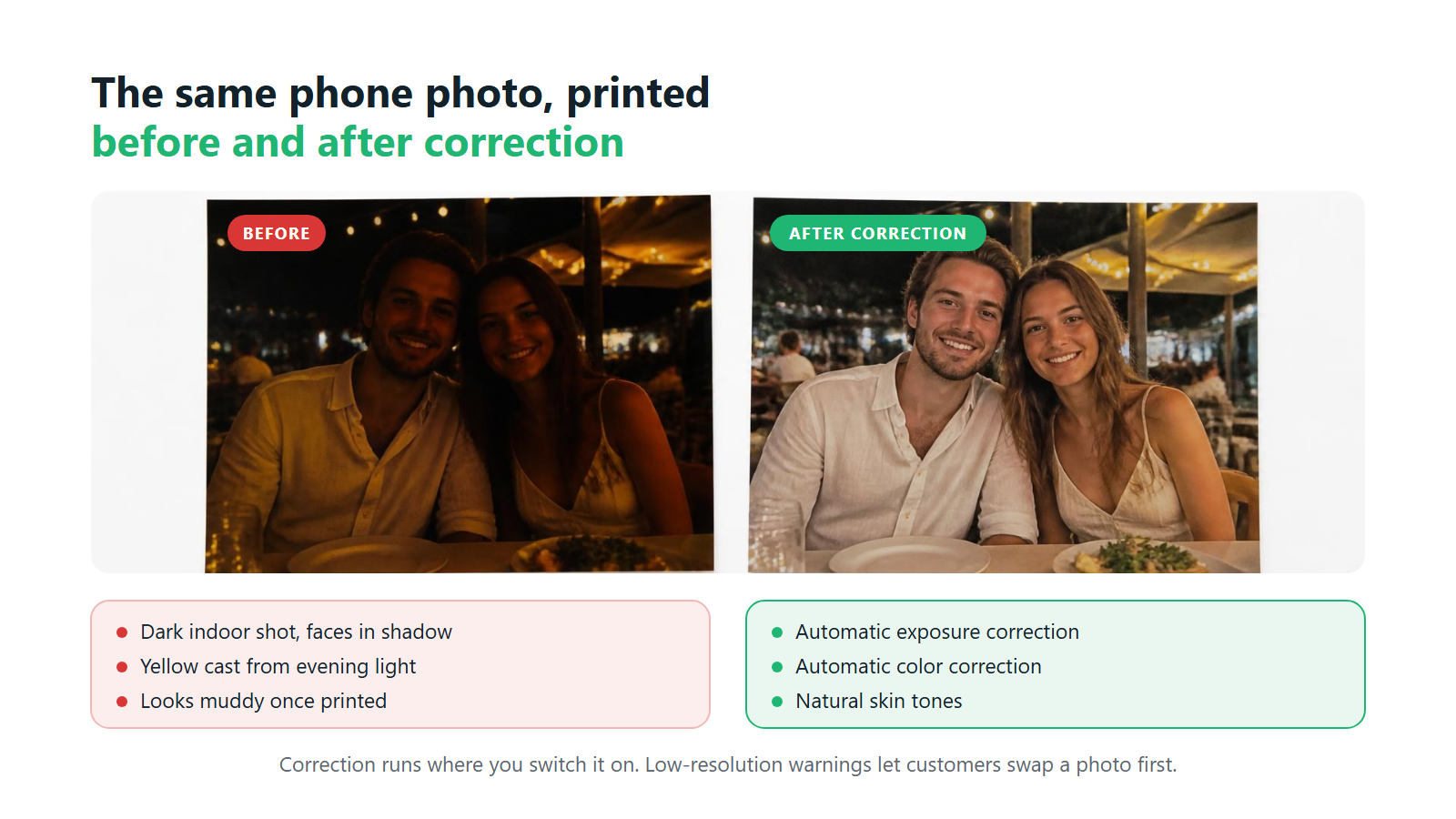
Phone photos bring a specific set of problems. Pictures forwarded through messaging apps are often compressed to a fraction of their original resolution. Screenshots of photos look sharp on a screen and soft on paper. Indoor and evening shots come out underexposed or with a yellow cast, and faces in backlit beach photos end up in shadow. On a postcard, where the image fills the whole card, every one of those flaws is visible.
The cheapest place to deal with this is before the order reaches production. A reprint costs you paper, ink, shipping, and support time, and a customer who receives a muddy card is unlikely to order the next set. Two things help most: correcting what can be corrected automatically, and telling the customer clearly when a photo is too small to print well, while they can still swap it. When you evaluate a photo postcard maker for online store owners, ask how it handles both. Our guide to choosing print-on-demand postcard software puts that question on the shortlist.
How Printbox Helps Improve Photo Quality on Postcards
Printbox addresses both. Through its partnership with Perfectly Clear, customer photos can be corrected automatically for color, exposure, and skin tones before printing, so the dim restaurant shot and the backlit portrait come out closer to what the customer remembers. The integration is switched on per product family, so you decide where it applies. Separately, Printbox shows a low-resolution warning before the order is placed: the customer sees that the photo may print poorly and can replace it, though they can still choose to order. Once the order goes through, a print-ready production file is generated automatically, so no one on your team has to prepare files by hand.
This short video from our channel shows the photo enhancement at work on real customer pictures:
Beyond the Photo: Adding AI-Generated Artwork
Not every customer has the right photo. Some took nothing but blurry shots from a bus window. Some want a card of a place they are about to visit, or of a city that means something to them without a picture to show for it. Others have a decent photo and would like it restyled as an illustration.
Masterpiece AI covers those cases. With text-to-image, a customer describes the card they want, for example a watercolor view of a harbor town at sunset, and gets artwork generated for it. With image-to-image, they upload their own photo and restyle it, so an ordinary holiday snapshot becomes a vintage travel poster or a sketch. The output is upscaled automatically to print resolution and goes through the same print engine as every other order. Every prompt is moderated automatically, blocking inappropriate requests and references to copyrighted characters or public figures.
For the seller, AI works as an optional extra path next to the manual editor. The catalog stays the same, the photo upload stays in place, and customers without a usable photo no longer leave without ordering.
Growing and Scaling Your Photo Postcard Business
Once you start to sell custom photo postcards online, the next question is what to offer the same customers. The hard part, a customer who trusts you with their photos, is already done. A customer happy with a set of cards is the easiest person to sell a photo book to.
Extend the catalog with related photo products. The same trip that produced ten postcards produced two hundred other photos. Natural next products are a photo book of the whole trip, a photo calendar with a month per destination, a photo album, or a poster of the single best shot. Each one reuses the customer’s photos and your existing traffic.
Build product ideas around occasions. Good photo postcard ideas for sellers start from the moments customers already photograph. Think of a “greetings from” set for every summer destination, a series of postcards from one road trip, or thank-you cards after a wedding or a family reunion. Back-to-school cards and holiday greetings in December follow the same logic. Event-driven cards follow their own logic, which we cover in our guide to selling wedding and event postcards online.
Recommend the next product at the right moment. Adobe data shows that 68% of consumers want personalized recommendations.2 The moment a customer has finished one design is the moment to suggest a better paper, a larger set, or a matching product made from the same photos.
Look for partners with photos. Travel photographers, tour operators, and event organizers sit on large galleries of photos their clients would happily print. Connecting those galleries to your store turns their audience into yours.
When you are ready to move beyond one channel or one market, our articles on whether print-on-demand is scalable, selling personalized products across multiple channels, and expanding into international markets cover the next steps in depth.
How to Grow a Photo Postcard Business with Printbox
Printbox runs postcards, photo books, calendars, albums, and posters on one platform, so a new product goes into the catalog you already run. If you sell through Shopify, Shopware, or a custom store, EC Sync keeps that catalog in sync with your store automatically. The Storefront module adds upselling: before the customer adds a product to the cart, a pop-up can offer an upgrade such as a special paper or a larger set. Buying paths are configurable, so you can build separate paths per product, device, or campaign, for example a shorter mobile path for travel cards ordered on the go.
For partners with photo collections, Gallery Link connects travel and event galleries straight to the editor. Printbox is white-label software: your brand faces the customer, and printing and shipping stay with you, on your own presses or with a fulfillment partner. To see how this fits together for postcards specifically, visit our postcard print-on-demand software page.
Frequently Asked Questions
Can customers create postcards from photos taken on their phone?
Yes, and for travel photos the phone is usually the only device they have at hand. The store needs a mobile-first editor that handles upload, text, and preview on a small screen. In Printbox, the Flex Editor is built mobile-first for cards and gifts, with a realistic preview before checkout.
How can I reduce poor-quality photo uploads in my store?
Correct what can be fixed automatically and warn customers about what cannot. Printbox works with Perfectly Clear to correct color, exposure, and skin tones automatically, and shows a low-resolution warning before ordering so the customer can swap the photo. Clear guidance on the upload screen, such as "use the original photo, not a screenshot," also helps.
Can customers without a suitable photo still order a postcard?
Yes, if the store offers an AI path. With Masterpiece AI, a customer can describe the card they want and get generated artwork, or restyle an existing photo into an illustration. The output is upscaled to print resolution, so it is ready for production like any other order.
Which other photo products can I sell alongside postcards?
The natural next products are photo books, calendars, albums, and posters, because they use the same customer photos and appeal to the same buyers. In Printbox they all sit on one platform and in one catalog, so adding them does not mean adding new software.
How do I grow a photo postcard business beyond the first products?
Sell more to the customers you already have. Add related photo products, build personalized travel postcards and occasion sets around the moments people photograph, and use upselling to suggest an upgrade before checkout. Once that works, expand into new channels and markets.
What are the key features of Printbox’s photo postcard software?
Printbox gives you two editors for postcards, the mobile-first Flex Editor and the Simple Editor, both with a realistic preview. Perfectly Clear corrects photos automatically, a low-resolution warning flags weak images, and print-ready files are generated for every order. Masterpiece AI adds an optional AI creation path, and the Storefront module adds upselling and configurable buying paths. It lets you sell custom photo postcards online alongside photo books, calendars, albums, and posters from one catalog.
Sources

Sylwia Kopeć
She collaborates with her team to develop and implement the company's marketing strategies. With a strong background in marketing communications, online marketing, and content marketing, she efficiently integrates these strategies into the brand. Her focus on omnichannel digital campaigns, keen analysis of client needs, and creative approach have delivered significantly enhanced Printbox's market presence.