How to Sell Print-on-Demand Postcards: A Complete Guide from Launch to Scale
Print-on-demand postcards are printed only after a customer orders them, so you can sell a full catalog of designs, sizes, and personalized cards without printing anything in advance. The customer creates or picks a card online, the order becomes a print file, and the postcard is printed and shipped to the buyer or straight to the recipient. This guide explains how to sell print on demand postcards step by step. It covers what the model is, which postcards and formats to offer, how to launch, when single orders beat bulk runs, where to sell, and how to grow once the first products work.
What Is Print-on-Demand for Postcards?
If you have ever typed “what is print on demand postcards” into a search bar, the short answer is this: you run the storefront and the design experience, and production starts only when someone has paid. There is no shelf of pre-printed cards waiting for a season that may not come, and no box of last year’s designs to write off.
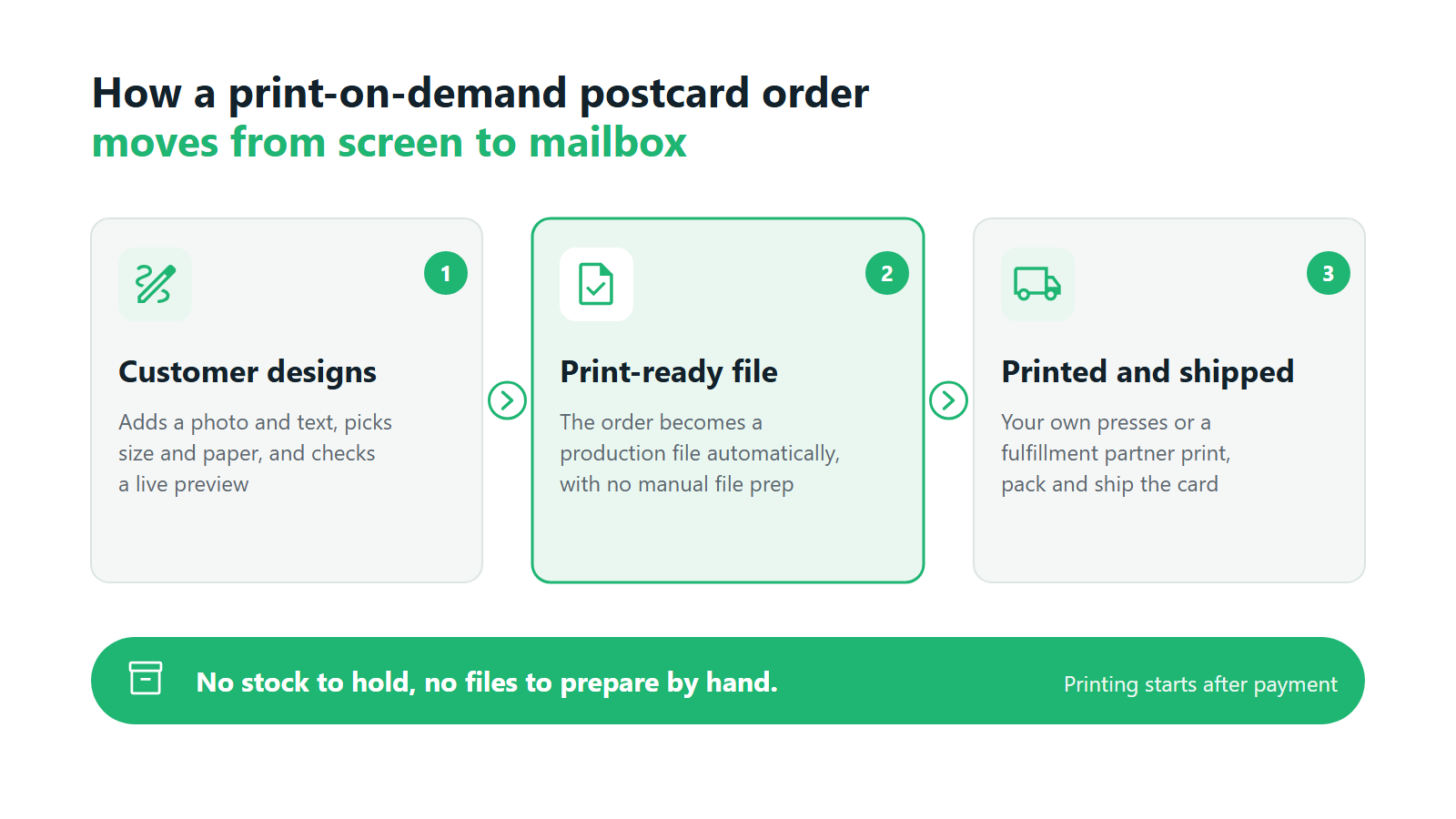
The flow has three stages. First, the customer personalizes a postcard in an online editor: they add a photo, write a message, pick a size and paper, and choose a quantity. Second, the order moves to production as a ready-to-print file, either to your own presses or to a fulfillment partner. Third, the card is printed, trimmed, packed, and shipped.
The economics live in the handoff between stage one and stage two. A postcard is a low-price item, so the margin on a single card disappears fast if someone on your team has to open each order, check the photo, and export a file by hand. Postcard sellers who grow make that step automatic before their first busy December arrives.
Types of Postcards You Can Sell
Postcards look like one product, but they serve very different buyers. Each type below has its own occasion, price point, and order size, which is why most successful catalogs start with two or three and add more later.
Photo and travel postcards. Customers turn their own holiday photos into cards to send home, or keep a set as a souvenir. Photographers, tourist shops, and travel brands sell them as collections. This type lives on image quality, so automatic photo enhancement and clear resolution warnings matter more here than anywhere else. Our guide to selling custom photo and travel postcards online covers how to build this line.
Wedding and occasion postcards. Save-the-dates, thank-you cards after the wedding, birth announcements, and holiday greetings. Orders are usually larger (one couple may need 80 or 150 cards), deadlines are fixed, and every card often carries a different guest name. We go deeper into this segment in our article on selling wedding and event postcards online.
Brand and business postcards. Thank-you inserts for e-commerce parcels, loyalty cards, promotional mailers, and cards for real estate agents or local services. Buyers here care about consistency with their brand and about reordering the same design quickly.
Event postcards. Festival souvenirs, conference giveaways, school and sports team cards, and photo cards printed from event galleries. The order often comes from one organizer, but the content comes from many people.
If you are collecting personalized postcard ideas for a first catalog, a simple filter helps: pick occasions where people already send cards and would pay more to add their own photo, name, or message. That is where selling custom postcards online earns a better margin than a generic rack card.
Postcard Formats and Finishing Options
The physical options you offer shape your margin, your shipping costs, and how many “it looks different than I expected” emails you answer.
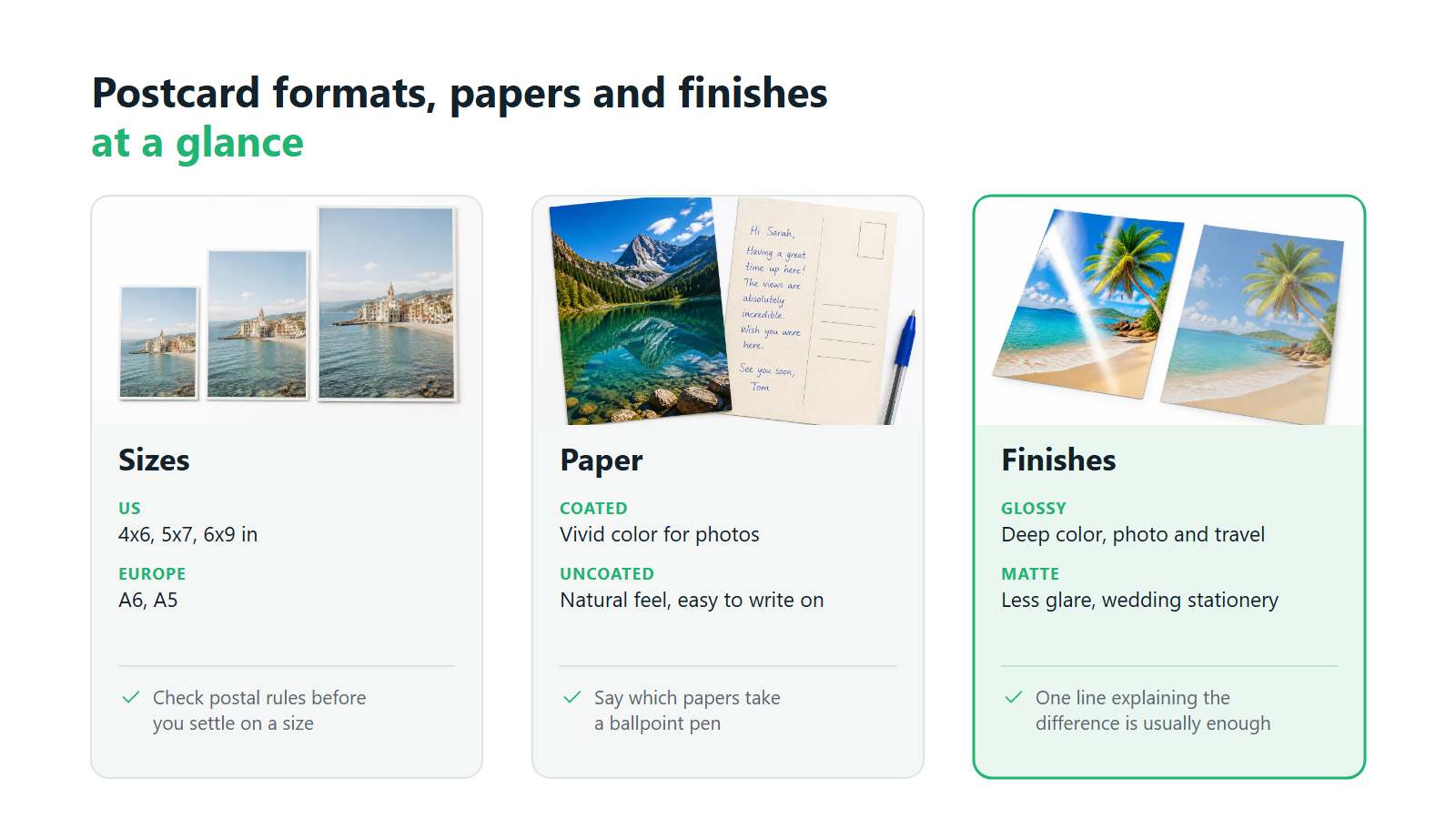
Sizes. In the US, 4 x 6 inches is the format most people picture when they hear “postcard.” 5 x 7 inches is common for greetings and announcements, and larger sizes such as 6 x 9 are used for promotional mailers. In Europe, A6 (105 x 148 mm) plays the same role, with A5 for larger cards. Check postal rules before you go big: USPS charges cards larger than 4.25 x 6 inches at the letter rate instead of the postcard rate. Square and custom sizes can work as a premium option, but each one adds a variant to price, test, and explain.
Paper. Postcards need heavy cardstock so they survive the mail without bending. Coated stock makes photos look vivid. Uncoated stock feels more natural and takes a handwritten note well. If your cards are meant to be written on and mailed, say clearly which papers work with a ballpoint pen.
Finishes. Glossy finishes give deeper color and suit photo and travel cards. Matte finishes reduce glare and fingerprints and suit wedding stationery and minimalist designs. Offering both, with one line explaining the difference, is usually enough. Premium extras such as soft-touch lamination or rounded corners raise the price point, but each one is another production step to agree with your printer.
In Printbox, sizes, papers, and finishes are configured as options in your catalog, so you decide which combinations to sell and can add or retire them as you learn what customers buy.
How to Start Selling Print-on-Demand Postcards
Knowing how to sell print on demand postcards comes down to six steps in the right order. Buying ad traffic before you have tested one order end to end is the most common way to lose money in the first month.
- Choose your software. The platform decides what your customers can do in the editor, how orders reach production, and how much manual work each order creates. Our guide to choosing print-on-demand postcard software sets out what to compare.
- Configure the catalog and formats. Start with a tight set: two or three sizes, two papers, and a matte and glossy option already give you a dozen variants to price and photograph.
- Choose how designs get made. Customers can upload their own photos into your layouts, personalize text and names, or generate artwork with AI. Each path attracts a different buyer, and many stores offer two.
- Set up production. Decide whether cards are printed on your own presses or by a fulfillment partner, and confirm the file format, color profile, and bleed your printer expects.
- Test an order. Place a real order, pay for it, and wait for the card to arrive. Check color, paper weight, trimming, packaging, and delivery time with a customer’s eyes.
- Launch. Start with your existing audience or a small paid campaign, watch which designs and occasions sell, and expand from there.
Anyone researching how to start a postcard business should spend the most time on steps three and five. The editor is what the customer sees, and the test order is the only way to find out what they will actually receive.
How Printbox Handles Postcard Design and Personalization
In Printbox, customers design postcards in an editor that runs inside your own store, with a live preview of the card as they work. The Simple Editor follows a “design first, configure later” approach that suits postcards and invitations: the customer builds the card, then picks the options. The Flex Editor is built mobile-first for personalized cards and gifts, showing only the options that matter for the product and a realistic 3D preview of the result. When a customer uploads a photo that is too small for the chosen size, the editor warns them about low resolution before they order.
For a whole series of cards, Variable Data Printing lets the customer upload a CSV file or type the data in a table. One design becomes dozens of cards with a different name or message on each, and every row becomes its own print file. For stores that want original artwork, Masterpiece AI adds an optional AI path next to manual design. A shopper can describe a card in a prompt (text-to-image) or restyle an uploaded photo (image-to-image), and the result is upscaled automatically to print resolution. Every prompt is moderated automatically.
Single Orders vs. Bulk Postcard Runs
Both models have a place, and the honest answer depends on what you know about demand.
Print-on-demand fits uncertain or personal demand. New designs, seasonal collections, and any card carrying a customer’s own photo or name should be printed per order. A design that flops costs you design time and some ad spend, and leaves no stock behind. For personalized cards, there is no other sensible model.
Bulk runs fit proven, unchanging designs. Once a non-personalized design sells steadily, for example a city postcard in a tourist shop, printing a few thousand copies in one run lowers the cost per card. The trade-off is cash tied up in stock, storage space, and the risk that demand drops before the cards sell.
Many postcard businesses run both: print-on-demand for the long tail and everything personalized, and bulk runs for a handful of best-sellers. There is also a middle case: one customer ordering 100 or 200 cards in a single session, such as a couple sending wedding thank-you cards or a company mailing a holiday greeting to clients. That is still a print-on-demand order, just a large one, often with a different name on every card. Our article on variable data printing for personalized postcards explains how to sell these personalized series without manual prepress.
How Printbox Handles the Technical Side of Selling Postcards
Printbox works with Shopify and Shopware, and with any custom store through an API. EC Sync keeps your store catalog, including postcard products, variants, sizes, and papers, in sync with Printbox automatically, so changes you make in Printbox appear in your store without custom sync code. Orders follow a separate, equally automatic path. When a customer pays, a print-ready production file is generated for the order and sent to your own production or your fulfillment partner, with no manual file preparation. The same platform handles a single personalized card and a larger order of many cards placed in one session, and you can configure quantity-based price tiers for larger orders. Printbox is white-label software, so your brand faces the customer while printing happens on your own presses or at your partner.
Where to Sell Print-on-Demand Postcards
There are two broad channel categories, and they suit different stages of the business.
Your own online store. You control the brand, the pricing, the customer data, and the design experience. Personalization works best here, because you decide exactly what the editor offers. Margins are higher without marketplace commission. The cost is that you bring the traffic yourself, through search, social, email, and ads.
Marketplaces. Large marketplaces and handmade or gift platforms bring shoppers who are already browsing for cards, which makes them a fast way to test which designs sell. In return you accept commission fees, strict listing formats, heavy price competition, and little ownership of the customer relationship. Deep personalization, such as a different name on each of 120 cards, is hard to offer inside a standard listing.
For most sellers, marketplaces are good for validating designs and your own store is where you build repeat buyers. Selling custom postcards online through both is common, as long as one catalog stays the source of truth. If you plan to run your own store on Shopify, our guide to selling print-on-demand postcards on Shopify walks through the setup, and our article on selling personalized products across multiple channels covers how to keep a channel mix manageable.
Benefits for the Customer
According to McKinsey research, 71% of consumers expect personalized interactions.1 A postcard is one of the most direct ways to meet that expectation, because the product itself carries the buyer’s photo, words, and names.
Personalization without design skills. A customer can turn a holiday photo or a wedding portrait into a finished card without opening design software. Layouts and AI generation lower the bar further, so the only skill needed is knowing what to say.
A preview before paying. Seeing the card with their own photo and text before checkout removes most of the doubt that stops people from buying. It also cuts complaints, since the customer approved what they are getting.
Fast turnaround on small orders. Small orders do not wait for a print run: a last-minute birthday card goes to production as soon as it is paid for.
Benefits for the Seller
For the business, the case for print-on-demand postcards rests on four points.
Low cost of entry. You do not buy stock before you sell it, so the upfront investment goes into the store, the catalog, and marketing. A new design costs time to create and nothing to keep in the catalog. That is what makes a postcard business without inventory realistic from day one.
No stock to write off. Postcards are seasonal and trend-driven. Printing per order means a Christmas design that did not sell this year costs you nothing in January.
Automated production files. With a print-ready file generated for every order, volume can grow without a matching growth in prepress work. For a product sold at a few dollars per card, this decides whether the margin survives.
Flexibility between single and large orders. The same catalog serves one customer buying a single card and a couple ordering 150 thank-you cards with a different name on each. Anyone learning how to sell print on demand postcards profitably should plan for both from the start.
When you are ready to compare platforms built for this category, our postcard print-on-demand software page shows how Printbox supports postcard sellers end to end.
Growing and Scaling Your Postcard Business
Once the first designs sell, the question shifts to how to grow a postcard business without the work growing at the same pace. Growth usually happens along four lines.
More product categories in the same catalog. Customers who buy photo postcards are natural buyers of greeting cards, invitations, calendars, and photo books. Adding categories to the catalog you already run raises basket value without starting a new business.
From single orders to larger series. Wedding, corporate, and event customers bring orders of a hundred cards or more. Personalized series with variable data are where basket value jumps, so they deserve their own landing pages and pricing tiers.
New markets and more stores. A second language, a second country, or a separate brand for a different audience. Our guide to expanding personalized products into international markets covers what changes when you cross a border.
More production capacity. At some point, outsourced printing gets expensive or slow, and bringing production in-house starts to make sense. Our article on moving from print-on-demand to in-house production sets out when that switch pays off.
Repeat buyers carry much of this growth. A first order that arrives on time and looks like the preview is your cheapest marketing for the second one. For the broader picture of which parts of the business hit their limits first, see our guide on whether print-on-demand is scalable.
How Printbox Supports Growth and Scaling
On one platform, Printbox handles a single personalized card and a larger order of many cards placed in one session, so higher volume does not require a change of system. As order numbers grow, automatically generated production files keep manual handling flat. When you open new markets, the storefront can be translated into any language. To raise basket value, you can show upselling offers before a product goes into the cart and set up different purchase paths per product, device, or campaign. Depending on your plan, you can run several stores on one Printbox account, with each store connected to Printbox on its own. Printbox has launched stores in more than 50 countries. Because printing stays on your side, expanding production, whether with a new press of your own or a larger fulfillment partner, does not require new software.
Frequently Asked Questions
What does print-on-demand mean for postcards?
It means each postcard is printed only after a customer orders it, so you hold no stock of pre-printed cards. The one-sentence answer to "what is print on demand postcards": the customer designs or picks a card online, the order turns into a print file, and the card is printed and shipped. It suits personalized cards and new designs best.
Do I need design skills to sell custom postcards?
No. You need a clear catalog and an editor that lets customers build cards from their own photos, ready layouts, or AI prompts. Most of the work in selling postcards is product selection, pricing, and marketing, with the design itself done by the customer.
Can I offer both single custom postcards and bulk runs?
Yes. A print-on-demand catalog handles one-off cards and a larger order of many cards placed in one session by the same customer, including personalized series with a different name on each card. For proven non-personalized designs, you can still print larger runs in advance alongside your on-demand catalog.
Can I start a postcard business without holding inventory?
Yes. A postcard business without inventory prints each card after it is paid for, so your upfront costs go into the store and marketing instead of stock. This is also the simplest answer to how to start a postcard business with limited capital: launch a small catalog, test real orders, and expand what sells.
How do I scale a postcard business beyond the first products?
Add related categories such as greeting cards and invitations to the same catalog, build offers for larger personalized series, and open new markets with a translated store. If you are wondering how to grow a postcard business without growing the team at the same rate, automate production files first, since manual prepress is usually the first bottleneck. Learning how to sell print on demand postcards well at small scale is the best preparation for all of this.
What are the key features of Printbox’s postcard design software?
Customers design postcards in Printbox's Simple Editor or Flex Editor with a live preview, running inside your own store. Variable Data Printing turns one design into a series of personalized cards from a CSV file or a table, and Masterpiece AI adds optional text-to-image and image-to-image creation with automatic upscaling. A print-ready production file is generated for every order, and EC Sync keeps your postcard catalog in sync with Shopify, Shopware, or a custom store.
Sources
- McKinsey & Company, next-generation personalization research, as cited in StackAdapt, Retail 2026 report, p. 14. ↩︎

Sylwia Kopeć
She collaborates with her team to develop and implement the company's marketing strategies. With a strong background in marketing communications, online marketing, and content marketing, she efficiently integrates these strategies into the brand. Her focus on omnichannel digital campaigns, keen analysis of client needs, and creative approach have delivered significantly enhanced Printbox's market presence.