You can sell canvas prints on demand through four kinds of channels: marketplaces, print-on-demand provider apps connected to a store, your own store with a personalization editor, and direct B2B sales. The right one depends on your stage, on how much control you want over your brand and customer data, and on whether you have production of your own or through a partner. For anyone deciding where to sell canvas prints online, this guide compares the options, explains what selling from your own store involves, matches channels to your stage, and shows how to move from a marketplace to your own store.
What Are Your Options for Selling Canvas Prints on Demand?
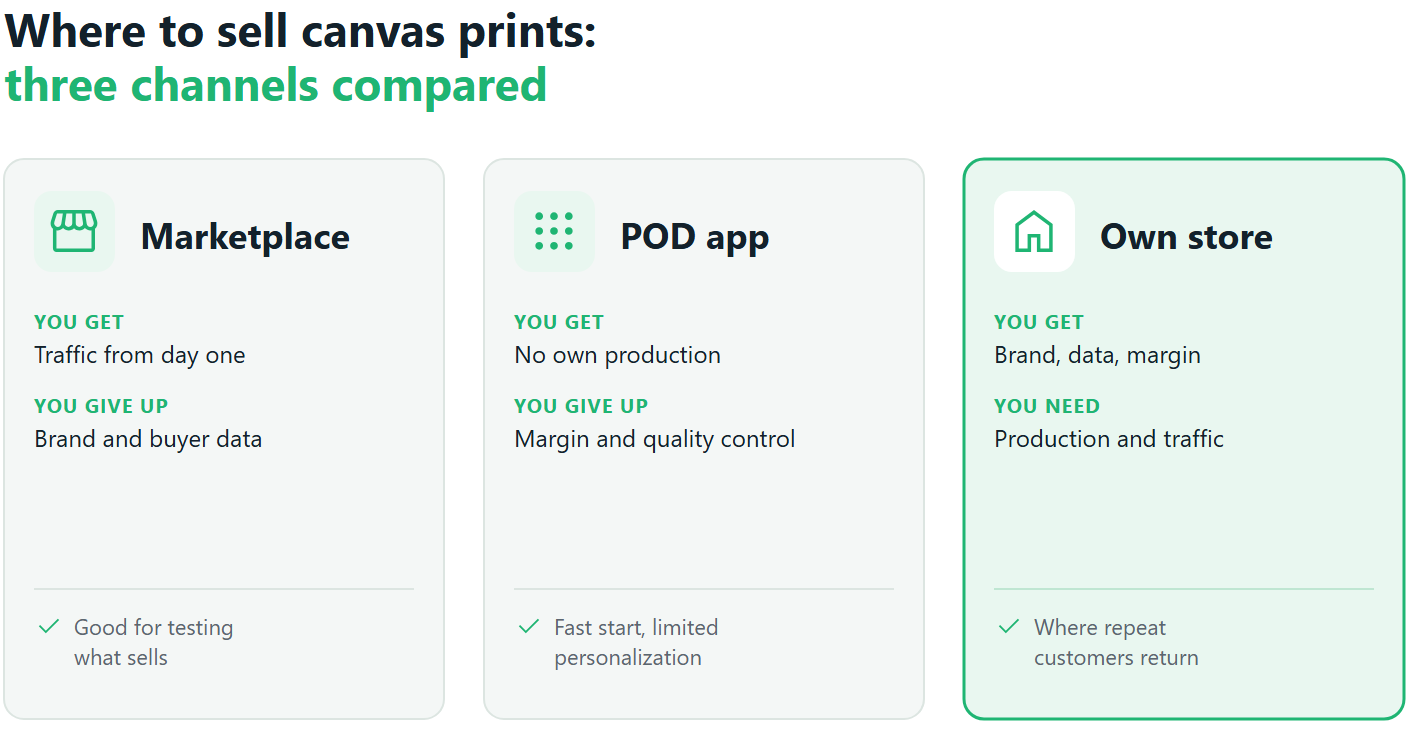
- Marketplaces such as Etsy or Amazon, where you list products next to many other sellers offering similar designs.
- Print-on-demand provider apps connected to your store, where a provider supplies a ready catalog and prints and ships each order.
- Your own store with a personalization editor, where customers design their canvas on your site under your brand.
- B2B and wholesale, selling directly to businesses such as hotels, offices, or interior designers.
| Channel | Brand control | Customer data | Personalization | Production | Best for |
|---|---|---|---|---|---|
| Marketplace | Low | Mostly the marketplace’s | Limited | Yours or a provider’s | Testing demand |
| POD provider app | Medium | Yours | Limited to the provider’s options | The provider’s | Starting without production |
| Own store with editor | Full | Yours | Full | Yours or a partner of your choice | Building a brand and repeat sales |
| B2B and wholesale | Full | Yours | By agreement | Yours or a partner’s | Steady volume from businesses |
The question of where to sell art print on demand rarely has a single answer. Most growing sellers end up using two or three of these channels for different jobs.
Selling Canvas Prints on a Marketplace
Strengths: – Traffic from day one. – A fast start with little setup. – A low barrier to entry.
Limits: – Someone else’s brand around your product. – Heavy competition from near-identical listings. – Little lasting relationship with the buyer. – Limited personalization: most marketplaces handle custom text or a single photo, not a full design experience.
When you first work out where to sell canvas prints online, a marketplace is a good place to learn what sells. It is a harder place to build a business customers come back to by name.
Selling Canvas Prints Through a Print-on-Demand Provider App
Print on demand canvas dropshipping works like this: you connect a provider’s app to your store, pick products from its catalog, and the provider prints and ships each order using its own process. The main advantage is that you need no production of your own. There are three limits. Margin depends on the provider’s prices. You control quality and branding only indirectly. Personalization is limited to what the provider’s tools offer.
There is no single best print on demand for canvas prints; the right provider depends on what you sell. When comparing them, look at:
- Canvas quality: materials, inks, and stretching.
- Formats: sizes, wraps, frames, and sets.
- Turnaround: production and shipping times to your main markets.
- Store integration: how cleanly orders flow from your store.
- Personalization: what customers can actually design.
Our article on whether Shopify has print on demand explains the difference between marketplace-style apps and full web-to-print platforms in more detail. Lists of the best print on demand canvas print sites change often, so test a sample order before you commit to any provider.
Selling Canvas Prints in Your Own Store with a Personalization Editor
To sell canvas prints from your own store, you run the storefront (on Shopify, Shopware, WooCommerce, or a custom build) and embed an editor where customers design their canvas. What you gain:
- Your brand on every page and every order.
- Your customer data, for remarketing and repeat orders.
- Control over margin and the shopping experience.
- A live canvas preview, so customers see the edges and layout before they pay.
- Upsells and multi-panel sets, with a split or collage canvas set up as a single product the customer designs in one go, so order value can grow.
What it requires: production, either your own wide-format line or a print partner you choose, and your own traffic. Our broader guide on selling across multiple channels covers how an own store fits with other channels.
One practical check before you choose a store platform: count your canvas combinations. Shopify allows three options per product and a capped number of variants, and size, wrap, material, and frame together can pass that cap. Make sure the personalization software can map the extra options without forcing you to split one canvas into several products.
How you sell canvas from your own store with Printbox. Printbox is white-label software embedded in your store; it does not print or ship. Customers design their canvas in an editor with a realistic preview, and paid orders reach your production or print partner as print-ready files.
You can launch a ready storefront under your own brand or connect an existing Shopify, Shopware, WooCommerce, or custom store. On Shopify, Shopware, or a custom store, EC Sync keeps your store’s catalog of sizes, wraps, and options in step with Printbox automatically. On Shopify, it maps options beyond the platform’s limits as add-ons linked to the main product in the cart, so one canvas stays one product. Your brand, your traffic, and your customer data stay with you. If you have no print shop, Printbox connects to print partners such as Prodigi.
Which Channel Fits Your Stage?
Deciding where to sell canvas prints online starts with where your business is today:
- Testing demand: a marketplace or a POD provider app. Low cost, fast feedback.
- Building a brand and repeat customers: your own store with an editor.
- A print shop with its own line: your own store plus B2B, so production stays busy.
- A combined model: a marketplace to find new customers, your own store to bring them back.
When you sell canvas prints from your own store alongside a marketplace, the marketplace can bring the first order, and the own store is where the second and third can happen. That is why the answer to where to sell art print on demand tends to change as the business grows.
How to Move from a Marketplace to Your Own Canvas Store
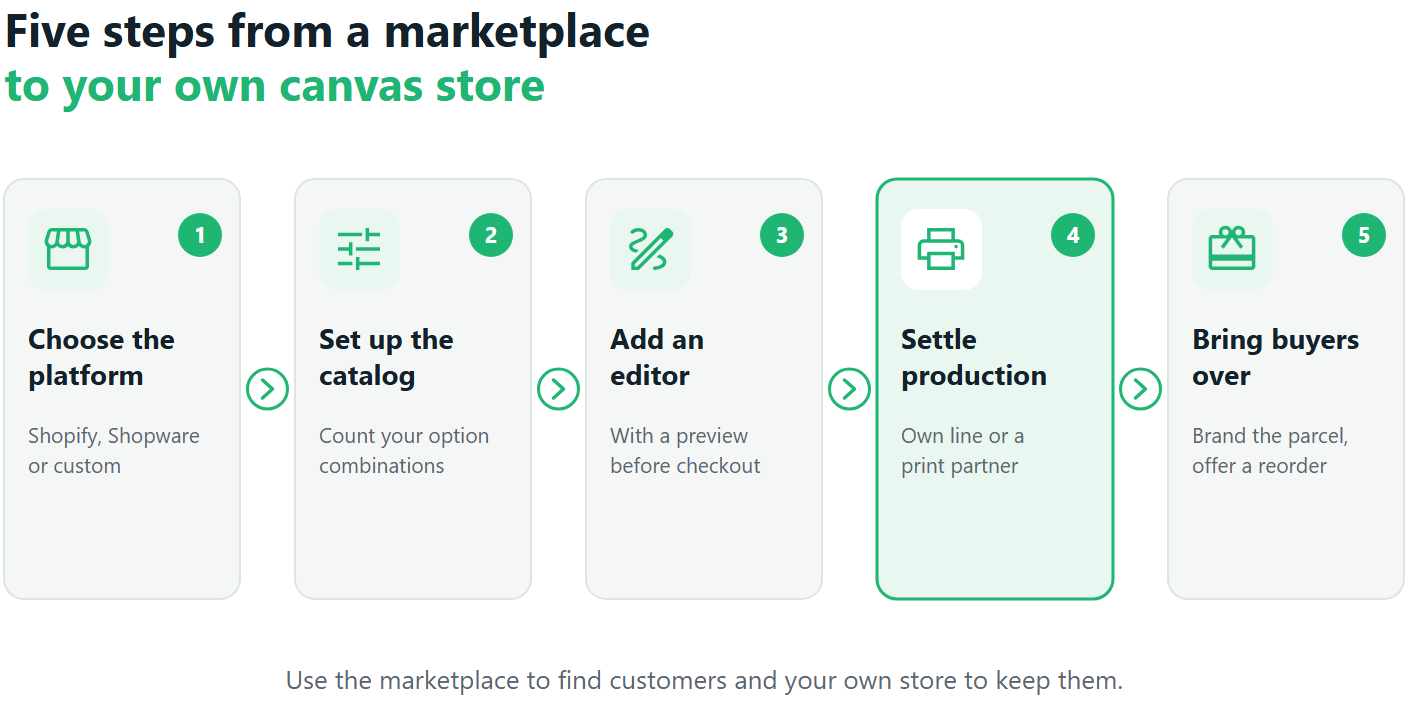
- Choose your store platform: Shopify, Shopware, WooCommerce, or a custom build.
- Set up the catalog: sizes, wraps, and materials, starting lean. Our guide to canvas wraps, materials, and frames helps here.
- Add an editor with a preview, so customers can design on your site.
- Settle production: your own line or a print partner.
- Bring marketplace customers over with your brand on the packaging, an insert with your store address, and an offer for the next order.
The canvas marketplace vs own store choice becomes much easier once the own store exists, because you can use both, each for what it does best.
How Printbox supports moving beyond a marketplace and growing. There are two ways in, depending on your stage. On Shopify, the Masterpiece AI Shopify app adds the Flex Editor with AI styling as blocks in your existing theme, with no rebuild.
As the business grows, the full Printbox platform adds EC Sync, which keeps your store’s catalog in step with Printbox automatically on Shopify, Shopware, or a custom store. The storefront can run in the language of each new market and offers several buying paths per product. Production grows on your side or with a print partner. Explore canvas printing software from Printbox, or go back to the full guide on how to sell canvas art with print on demand.
Frequently Asked Questions
Where is the best place to sell canvas prints on demand?
It depends on your stage. A marketplace helps you test demand quickly; your own store builds a brand and repeat customers. For most growing sellers, the answer to where to sell art print on demand is a combination, with the own store as the long-term base.
Can I sell canvas prints on a marketplace and in my own store at the same time?
Yes, and many sellers do. The canvas marketplace vs own store question is easiest to answer by giving each a job: the marketplace finds new customers, and your own store brings them back.
Can I sell canvas prints from my own website without owning a printer?
Yes. You need production, but it does not have to be your own: a print partner can print, stretch, and ship for you. Printbox provides the software and connects to print partners; the option for sellers without a print shop explains how that works.
What is the difference between a print-on-demand provider app and a web-to-print platform?
A provider app gives you its catalog and its production; you sell what it offers. A web-to-print platform gives you an editor and a catalog you control, and sends orders to the production you choose. Print on demand canvas dropshipping is faster to start; a web-to-print platform gives you more control as you grow.
Do I need Shopify to sell canvas prints with Printbox?
No. Printbox works with Shopify, Shopware, WooCommerce, or a custom store, and can also provide a ready storefront under your brand. Our article on selling wall art and canvas prints on Shopify covers the Shopify route.
What are the key features of canvas print-on-demand software from Printbox for selling in my own store?
Printbox offers a white-label canvas editor with a realistic preview and edge styles customers see as they design. It syncs your catalog with Shopify, Shopware, or a custom store, runs a translatable storefront with several buying paths and upgrade offers, and delivers print-ready files to your production or a print partner. It covers the full path for selling under your own brand once a marketplace is no longer enough. For a deeper look at how orders reach production, see the production workflow. For scaling beyond one store, see how to scale a print-on-demand business.

Sylwia Kopeć
She collaborates with her team to develop and implement the company's marketing strategies. With a strong background in marketing communications, online marketing, and content marketing, she efficiently integrates these strategies into the brand. Her focus on omnichannel digital campaigns, keen analysis of client needs, and creative approach have delivered significantly enhanced Printbox's market presence.