You don’t need to rebuild your store to add personalization. A web to print API lets you keep the platform you already run and plug a professional photo editor into it. That matters because the usual alternative, replatforming onto a legacy all-in-one, carries a high total cost of ownership (TCO) and real vendor lock-in risk. You also can’t afford fresh technical debt when the buying experience is now a big part of how you compete. A web to print API sidesteps most of that. It’s modular and standardized, not a one-off custom integration you’ll be babysitting for years.
An API-first web to print approach keeps the technical work contained and lines it up with what the business actually needs. You embed advanced photo editing into your current stack, skip the costly replatforming, and keep the investment you’ve already made. This guide covers what a web to print API is, when API-first makes sense, the main integration scenarios, and what to check before you commit.
What Is a Web-to-Print API?
A web-to-print API is a collection of programmatic interfaces that let businesses add print product customization and ordering capabilities into their current digital platforms. These APIs offer a range of functionalities, including product configuration, image editing, and order management, which are essential for both B2B and B2C applications. Unlike traditional integrations that often require heavy customization and can quickly become outdated, APIs provide a more flexible and standardized approach to connecting disparate systems.
A common misconception is that APIs are akin to plugins, but in reality, they do far more. Where plugins might offer a narrow set of features, often tied to specific software, APIs allow for comprehensive integration, making print-domain logic directly accessible to surrounding systems. This accessibility ensures that print-specific rules, output constraints, and order states are first-class components within your technology ecosystem.
As web-to-print APIs have become table stakes in the personalized product space, the real competitive distinction has shifted from API availability to architectural integrity – specifically, how cleanly print-domain logic is exposed to the systems around it. Organizations that treat API access as a checkbox often discover, post-integration, that the cost of bridging abstraction gaps rivals the savings they expected from not replatforming. The architecture that prevents this is one built API-first, where print logic – product rules, output constraints, order state – is a first-class citizen of the interface, not an afterthought behind it.
Integrating web-to-print capabilities, particularly through headless web-to-print solutions, requires understanding the nuances of copyright and trademark protection. Consider these legal aspects as you navigate copyright and trademark protection during API integrations.
Why Use an API-First Approach for Web-to-Print?
An API-first web-to-print strategy keeps your business flexible and adaptable. This approach prioritizes designing APIs before building out full functionality, so your systems can slot into a changing digital ecosystem. This modular strategy reduces the risk of vendor lock-in and facilitates faster time-to-market while making future upgrades more manageable.
API-first integration aligns directly with C-level priorities by reducing risk and lowering TCO. It supports the layering of new capabilities onto existing systems without disturbing the core commerce or fulfillment logic. This is the core idea behind headless web to print: your frontend and the print backend are decoupled, so each can evolve on its own. A headless web to print setup is exactly what an API-first platform is built to support. An API-first web to print model is what makes that possible without a rebuild. These attributes mean you can swiftly adapt to shifts in demand without the need for extensive replatforming efforts or disruptions.
Keep your current e-commerce platform
With an API-first approach, businesses can incorporate new functionalities without discarding existing systems. It’s a way to add new capabilities, like advanced photo editing, to your sales platform without disrupting the systems underneath.
Full design freedom
Decoupling the user interface and user experience (UI/UX) from backend constraints allows you to craft unique customer experiences while using back-end improvements. Such flexibility supports innovation without compromising on operational performance.
Scalability
Scalability is crucial for businesses expecting growth. An API-first strategy allows the system to handle increased loads efficiently, catering to peaks in demand without performance degradation. As your print operations expand, this approach ensures your technology infrastructure can keep pace, delivering on both performance and customer expectations. In practice, Printbox runs stores handling 80k+ monthly visitors through peaks like Black Friday without performance drops.
The dominant hidden cost in print platform modernization is rarely the new technology itself – it’s the workflow disruption that occurs during transition, simultaneously eroding team capacity and customer experience. Leaders who frame the API-first decision as “replace or retain” are addressing the wrong problem; the strategic question is how to extend the value of existing systems while adding capabilities those systems were never built to carry. Composable architectures that layer print personalization capabilities onto a live platform – without touching its core commerce or fulfillment logic – are how scaling companies avoid that disruption tax entirely.
Key Integration Scenarios
A capable print editor API exposes product rules and output constraints, not just a canvas. A print editor API connects cleanly to different systems, including leading e-commerce platforms, ERP/MIS systems, and custom storefronts. In each scenario, understanding business drivers, technical considerations, and potential pitfalls is key to successful web to print API integration. Get the web to print API integration right and every new channel gets easier, not harder.
Connecting with Shopify
For e-commerce businesses using Shopify, extending the platform with web-to-print API capabilities can help you maximize sales during peak seasons and enhanced customer engagement through dynamic customization options. With Printbox’s EC Sync, Shopify variants like size and cover map straight to print parameters, and Printbox stays the source of truth for what can be produced. That’s photo editor API integration done the clean way, no manual sync between store and press.
ERP & MIS integration
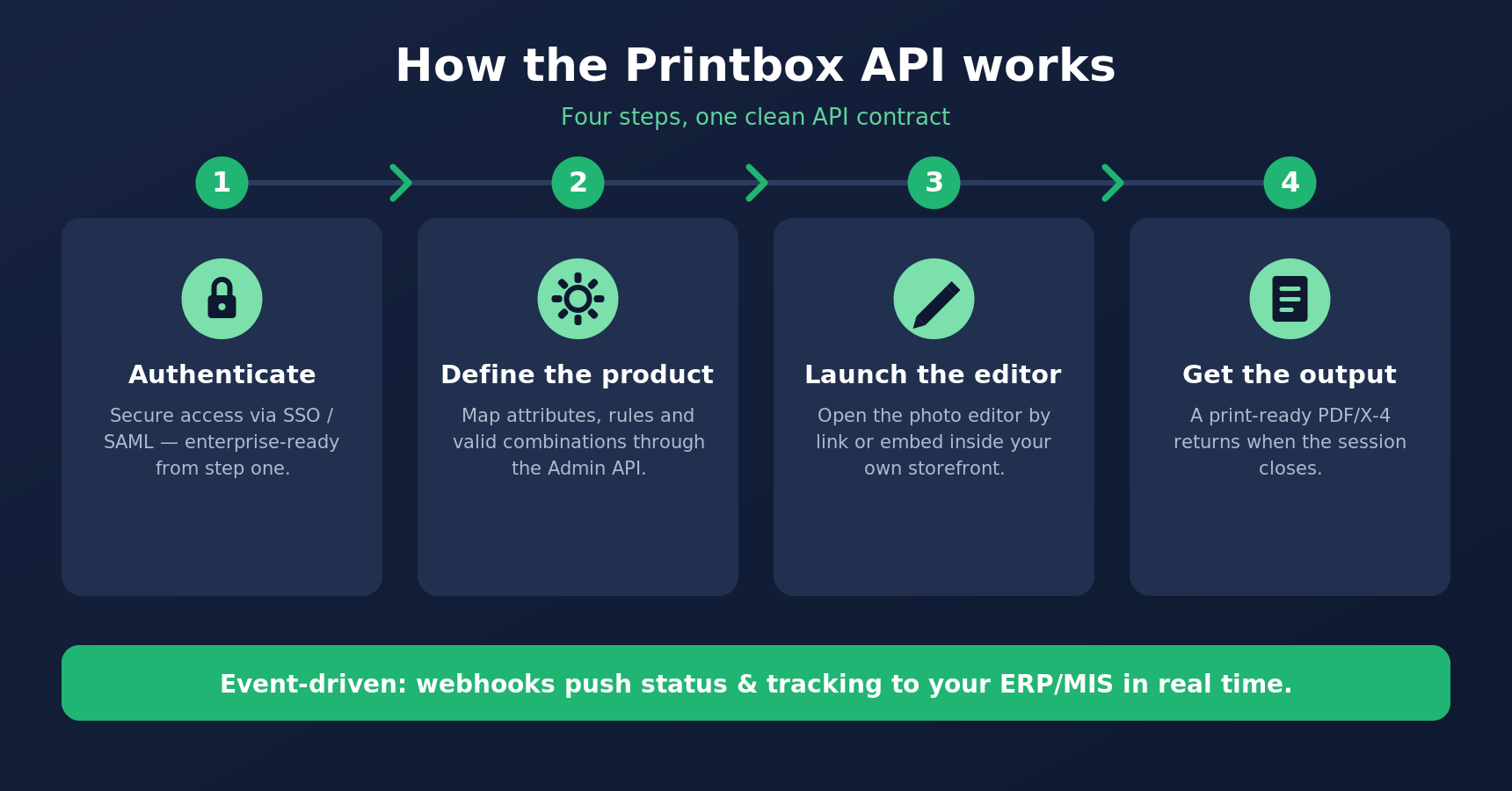
Effective web to print ERP integration allows print workflows to be bridged with enterprise systems, ensuring data consistency across operations. This connection mitigates risks commonly associated with detached data silos, tightening everything from inventory to order fulfillment. Because Printbox is event-driven, webhooks push order-status and tracking updates to your ERP or MIS the moment they change. It’s the same mechanism behind the Prodigi fulfilment integration. A real web to print ERP integration removes the manual pre-press handoff.
Custom storefronts
Custom storefronts offer unique opportunities for API integration. For React or Vue teams, photo editor API integration keeps the editor as one component among many. Tailoring the integration to meet specific business needs involves detailed understanding of customer interaction requirements and backend operations, ensuring that bespoke consumer experiences are matched with reliable, efficient backend systems.
In enterprise personalized product operations, integration failure rarely stems from a single broken connection – it compounds from a point solution optimized for one environment that gradually introduces brittleness across all others. The consequence is a fragmented integration surface where each new channel or fulfillment partner demands a disproportionate engineering investment, quietly eroding the company’s speed-to-market advantage. The integration architectures that scale without this compounding cost are built around a stable, expressive API contract – one that serves Shopify storefronts, ERP data flows, and bespoke commerce environments from the same underlying surface, without environment-specific workarounds.
What to Look for in a Web-to-Print API
Choosing the right web-to-print API involves more than evaluating features; it’s about ensuring long-term reliability and scalability. Scope your work around three things: documentation, webhooks, and uptime: a strong web to print API earns trust in the first hour a developer reads the docs. Treat the web to print API integration as a platform decision, not a plugin install. Start by examining the quality of the API documentation – poor documentation can indicate hidden costs in terms of time and effort for integration.
Consider event-driven capabilities that support real-time customer interactions through webhooks and event-driven architectures. These aspects are vital for maintaining a dynamic CX that meets modern consumer expectations.
Security and uptime matter just as much. Ensure that security measures conform to industry standards and that downtime is minimized with clear Service Level Agreements (SLAs). These considerations are paramount at the board level, where operational stability is critical. For enterprise access, look for single sign-on; Printbox supports SSO via WorkOS.
A practical evaluation checklist for decision-makers should include:
- Documentation quality: Are the resources clear and comprehensive?
- Extensibility and support: Is there room for growth and access to support when needed?
- Security and uptime: Are the protections adequate and the availability rate high?
Ultimately, poor documentation is a red flag – it indicates potential delays and added integration difficulty. Prioritize APIs with strong infrastructure and support so adoption goes smoothly. With Printbox, the flow is simple. Authenticate (SSO/SAML), define product attributes through the Admin API, launch the editor by link or embed, and get a print-ready PDF/X-4 when the session closes. Developers can dry-run configurations in the Editor Playground before anything reaches production. To compare how leading platforms approach integration, see our guide to the best web-to-print software.
Next Steps
For businesses in the personalized photo product industry looking to enhance their capabilities with web-to-print APIs, consider exploring further practical applications. Book a Printbox demo to see how the platform can synergize with your business operations. If you’re contemplating a tailored approach or need more information, contact the Printbox team for personalized advice and solutions. Moving to an API-first approach can reshape your operations, and the right guidance keeps that change aligned with your goals.

Sylwia Kopeć
She collaborates with her team to develop and implement the company's marketing strategies. With a strong background in marketing communications, online marketing, and content marketing, she efficiently integrates these strategies into the brand. Her focus on omnichannel digital campaigns, keen analysis of client needs, and creative approach have delivered significantly enhanced Printbox's market presence.