Capturing the Gen Z Customer. Why Speed and Social Media Integration Matter

A customer finds your storefront through Instagram Stories, taps the link in bio, and lands on a personalized photo gift. They hit “customize” – and then chaos. Long load time. No guest checkout. Awkward image upload flow that wasn’t built for thumb-only navigation. That’s frequently where the sale dies.
For Gen Z shoppers, personalized photo products aren’t impulse buys – they’re emotion-led, socially connected purchases. And when those expectations aren’t met in seconds, conversion nosedives and CPAs climb. Understanding Gen Z shopping habits is key to reversing that trend. We’ll walk you through how to turn things around: by building speed, social, and UX precision directly into your workflows.
Mobile-First is Non-Negotiable
Mobile traffic isn’t rising – it’s already dominant. In most e-commerce verticals, mobile represents 70-80% of total traffic, and for younger buyers, that can be even higher. Personalized photo products follow the same pattern. Gen Z customers design and buy photobooks, calendars and phone cases directly from their phones – not just for convenience, but because that’s where the photos live and where trust is built. Gen Z shopping habits continue to reinforce the importance of seamless mobile experiences. Yet many platforms still treat mobile as an afterthought.
The difference between “responsive” and truly mobile-first lies in intent. Mobile-first platforms prioritize screen real estate, finger reach, and interaction speed when building the experience. That’s not limited to layouts – it extends into how project editors function, how image uploads are handled, and how checkout flows minimize effort.
Market observation: In photoproduct commerce, “mobile-first” is no longer a viewport exercise – creation and checkout must be designed for small screens from the outset to protect conversion. Implication: Shrinking desktop flows increase CPA and reduce AOV among Gen Z. Strategic response: We prioritize RWD editors and mobile journeys and use rapid A/B testing to tune the highest-friction steps without diluting complex personalization.
A fully mobile-ready personalization platform also preserves emotional momentum. Picture someone creating a calendar gift on their lunch break – they won’t wait through clunky interfaces or restart because autofill failed. This is where responsive design elements, autosave functionality, and real-time previews do heavy lifting.
For more on how mobile usability shapes creative behavior – especially among Gen Z – explore our view on Mobile-First Design Importance.

The “Insta-to-Print” Pipeline
There’s no gap between social and commerce anymore – not for the customer. When Gen Z saves a memory to their Instagram story highlights, they already consider it print-ready. This trend is further amplified by Gen Z shopping habits that combine emotional expression with fast gratification. The standard funnel is vanishing. Instead, e-commerce teams have to build new pipelines for a social-native reality: one-click design launches from DM links, image ingest from social logins, and asset handling that doesn’t break infrastructure at scale.
But plugging in these workflows isn’t just a UI task. Platforms need to move high-resolution imagery from walled gardens like Instagram and Facebook into personalized print projects, often within seconds. That means dealing with limited API access, inconsistent file formats, metadata weirdness – and always, massive file sizes.
Market observation: Social-native funnels create bursty imports and heavy media transforms that routinely overwhelm brittle backends. Implication: “Insta‑to‑Print” breaks at API rate limits and timeouts unless ingestion, rendering, and delivery are decoupled and elastic. Strategic response: we handle spikes via queues and autoscaling workers on GKE, fronted by a global CDN, and integrate through stable APIs with retry/rate‑limit logic – keeping the editor responsive while the pipeline scales in the background.
Infrastructure matters here. You’re not just building a pretty interface – you’re orchestrating a choreography between real-time previews and backend resilience. Even a 1-second lag between image upload and preview renders can feel broken to a user operating in Instagram-rewired expectations of speed. Especially for users engaging with social media printing workflows, technical robustness is critical.
For more on building sustainable social commerce workflows, see our take on Integrating Social Media Platforms for Print Services.

Speed Kills… Friction
It’s easy to obsess over visual design and forget that speed is its own kind of beauty. The reality is sobering: even with killer customization flows and engaging previews, the final conversion often fails in the last 30 seconds. Why? Because that’s when many platforms reintroduce friction through slow checks, unclear pricing, or extra login walls.
Let’s make this concrete. Imagine your workflow still recalculates shipping and tax costs only after a user hits “checkout”. Or requests billing address manually before showing total price. Gen Z, used to apps that show predictability first, won’t wait around. A fast checkout experience is not just appreciated – it’s expected.
Market observation: Checkout abandonment in Gen Z is driven by micro‑frictions – extra fields, slow recalculations, and identity hurdles – more than by intent. Implication: the final 60 seconds decide CPA and repeat rates. Strategic response: we integrate accelerated payments and social logins via APIs, pre‑compute totals (shipping, taxes), autosave projects, and rely on low‑latency delivery paths to make confirmation feel instantaneous.
Better checkout flows combine predictable costs, social login options, and memory-saving autosave functions. That last point – autosave – often gets overlooked, but it’s exactly what brings a shopper back mid-session later. Especially when their original journey began in a space like TikTok, and retention hinges on muscle memory, not email flows. Delivering a smooth, fast checkout experience can be the difference between bounce and conversion.
This ties closely with our efforts in Reducing Friction in User Experience. Small wins here stack up to major gains in CPA and AOV.
Gamification and UX Design
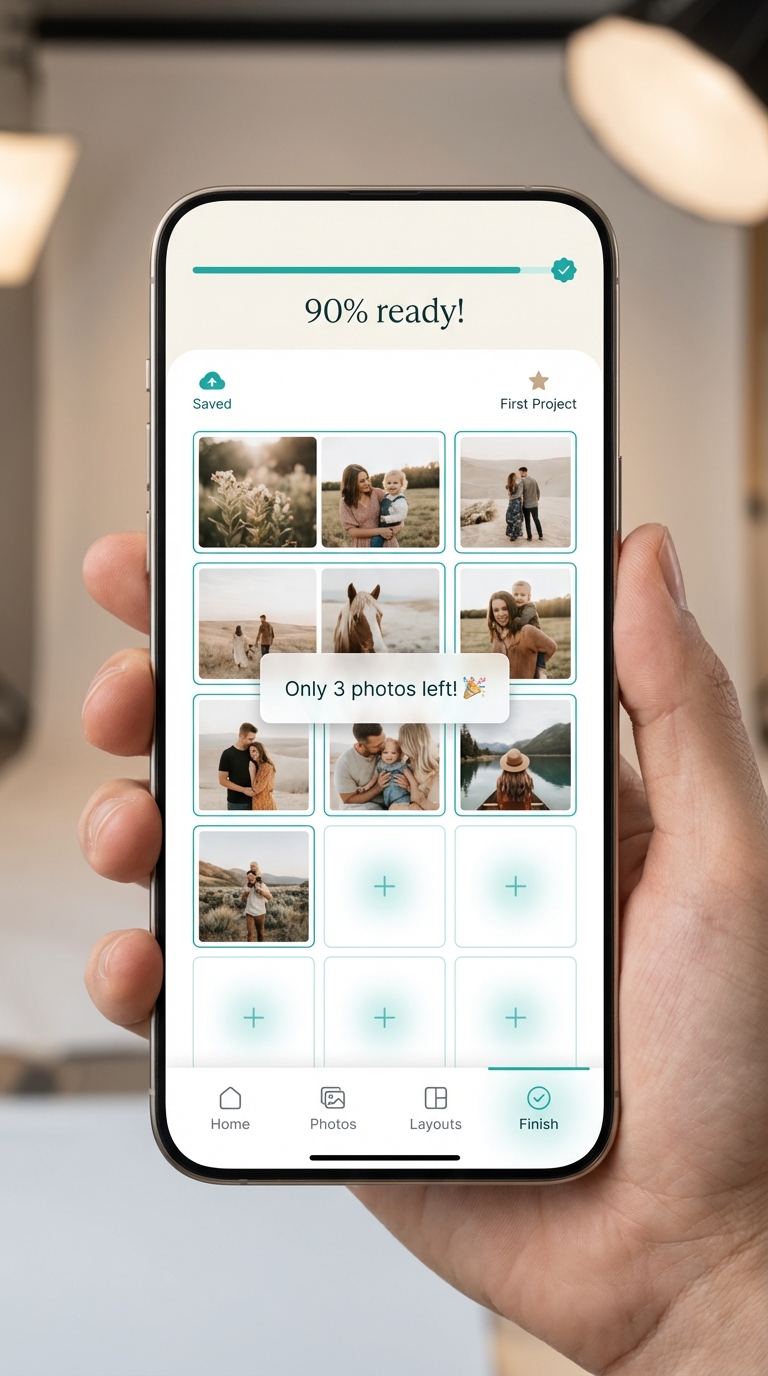
The word “gamification” gets thrown around, but too often what brands end up with are gimmicks – spinwheels, pop-ups, confetti. For Gen Z, those feel like ads. But progress bars? Instant post-preview rewards? Badging for returning to an unfinished photo book? Those actually work.
Gamification has to serve emotional velocity. Interactive UX should motivate – not manipulate. Photo personalization is often sentimental; the goal shouldn’t be to create a dopamine loop, but to lightly nudge the user toward achievement. That’s where real-time feedback, preload animations, and graceful state saving make a difference.
Market observation: Lightweight gamification – clear progress, instant previews, micro‑rewards – can lift completion, but gimmicks that slow or distract erode trust. Implication: motivation design must be experiment‑led and accessible. Strategic response: we instrument journeys, run controlled tests on guidance/rewards, and keep feedback real‑time, while favoring patterns that respect accessibility constraints validated by audits and data.
Designing personalization flows for Gen Z means balancing playfulness, accessibility, and performance. Skip-load rendering, in-line tips, and progressive project building all contribute to a feeling of “flow” that builds on their expectation from creative platforms like Canva or TikTok editing tools. Integrating light-touch gamification into instant photo products workflows supports both engagement and completion.
Next Steps
Looking to see these principles live inside a real Gen Z‑optimized user journey? Book a Printbox demo to explore how our platform enables mobile-first design, elastic infrastructure, and frictionless checkout out of the box. Have a specific integration or UX challenge in mind? Contact the Printbox team – we’re happy to dig into the details.
Whether you’re focused on scaling instant photo products across mobile or building reliable paths for social media printing, aligning your strategy with Gen Z shopping habits has never been more essential.
How does too many choices affect photo product conversions?
Excessive customization options can overwhelm users, causing decision fatigue that leads to hesitation, abandoned carts, and lower conversion rates—even if the UX appears comprehensive on the surface.
How do AI photo book creators improve user experience?
AI-powered photo book tools organize images, suggest layouts, and generate first drafts automatically, helping users avoid creative block and complete their projects with less effort.
Which metrics reveal friction in product personalization funnels?
Metrics like time-to-first-decision, decision completion rate, and frequency of session backtracks highlight hidden friction points not visible in traditional UX conversion funnels.
Can automation in photo personalization still allow brand control?
Yes, rule-based decision engines let companies automate creation while enforcing brand and campaign guidelines, balancing personalization with consistency and compliance at scale.

Sylwia Kopeć
She collaborates with her team to develop and implement the company's marketing strategies. With a strong background in marketing communications, online marketing, and content marketing, she efficiently integrates these strategies into the brand. Her focus on omnichannel digital campaigns, keen analysis of client needs, and creative approach have delivered significantly enhanced Printbox's market presence.